
Provider pair
OCI DNS + Google Cloud DNS: one DNS zone on both
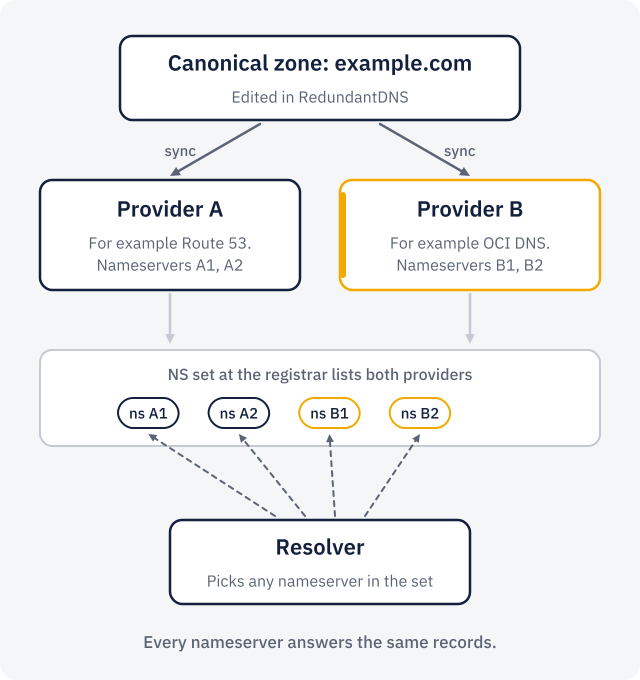
Run the same zone on OCI DNS and Cloud DNS at once. RedundantDNS writes every change to both, verifies them and probes their nameservers, and the NS set at your registrar lists both, so either one can answer.
How this pair behaves
- OCI DNS: the apex NS is rewritten to list the nameservers of every provider.
- Cloud DNS: the apex NS is rewritten to list the nameservers of every provider.
- With the "manage an existing zone" level on Cloud DNS, the key can edit every zone in its project: use a dedicated project for isolation.
- Features that only one provider has (for example provider-specific routing) are outside the canonical zone. The zone's capabilities are the intersection of both providers.
Set it up
- Connect OCI DNS with an API signing key of an OCI user (permission guide).
- Connect Google Cloud DNS with the JSON key of a service account (permission guide).
- Create the zone in RedundantDNS, or adopt the one you already have on either provider.
- Attach both connections. RedundantDNS creates or adopts the zone on each and applies the records.
- Set the NS records at your registrar to the nameservers of both providers, as the dashboard lists them. The delegation check tells you when it is live.
Permissions, per access level
Pick the level per connection. The guides have the exact policies and roles to copy.
| Provider | Create and manage zones | Manage an existing zone |
|---|---|---|
| OCI DNS | Policy "manage dns" on one compartment: create zones there, write records and apex NS, delete on detach. | Policy "use dns" with a condition on one zone OCID: read the zone and update its records, nothing else. |
| Google Cloud DNS | Predefined role DNS Administrator (roles/dns.admin) on the project. | A custom role with the managedZones get/list, changes and resourceRecordSets permissions. It cannot create or delete zones. |
Good to know about each provider
OCI DNS
- Record sets are updated one at a time, idempotently. The SOA is never touched.
Google Cloud DNS
- Cloud DNS has no per-zone permissions: the "existing zone" level can edit every zone in the project. Keep a zone that must be isolated in a dedicated project.
- Changes replace whole record sets atomically; large updates are split into changes of at most 1,000 additions and 1,000 deletions. Record sets with a routing policy are left alone.
What the providers charge
With your own accounts you pay the providers directly and RedundantDNS charges only its plan. In managed mode these costs are passed through at cost plus 20%, line by line. Public list prices, collected on 2026-09-23; check the providers’ pages before relying on them.
| Provider | Per zone | Queries |
|---|---|---|
| OCI DNS | no per-zone charge | $0.85 per million, with a monthly free allowance (check Oracle’s page for the exact allowance) |
| Google Cloud DNS | $0.20 per zone per month (first 25), then $0.10 | $0.40 per million (first billion), then $0.20 |
Related pairs
Put your zone on OCI DNS and Cloud DNS
Start with a 30-day trial: one zone on two providers you already have, no card. Plans from $9 a month after that.